

Some call it the post-mortem meeting, and some call it the retrospective review. We like to call it retro. Yep, you got that right. We are talking about the sprint retrospective meeting. Or, the retrospective meeting, in short.
But why are we talking about it today? Because, Brian, we'd like to explore why so many agile teams swear by it. Yeah, tell us, why do they do it anyway? Because:
- It is a time to reflect on how things went during the last sprint.
- It identifies room for improvement and highlights what's working well to continue doing that.
- It gets the whole team working to figure out how they can be more effective with every sprint.
- It helps build a plan for improving the way your team works.
Now, there are quite a number of ways you can do that. Let's check them out.
There are various formats for conducting a retrospective meeting.
Now, work doesn't always need to look like work, does it? We can also experiment with the processes to have a little fun. There are actually numerous ways you can do that. You can find a list of amazing ways to do it here. Let's go through four ways to give you an idea.
1. The classic retrospective
Classics always stay in fashion. This list would be incomplete without including the following three questions:
- What went well?
- What didn't go well?
- What can be improved?
These questions provide a structured format for conducting your team's retrospectives. In addition, they are simple and easy to understand.
2. Start, stop, and continue.
If you find that your sprint retrospective meetings aren't working as they should, likely because your team spends more time talking than focusing on necessary actions, this is a great way to run a retrospective.
- Create three columns on a whiteboard labeled "Start," "Stop," and "Continue.".
- Have team members reflect on each verb for at least five minutes and write their thoughts about each on sticky notes.
- Post each note on the whiteboard under the appropriate column.
- Use dot voting to decide on the most important topics to discuss, and create an action plan based on the ideas generated.
What this method does is bring back the focus on action.
3. Glad, Sad, and Mad
This technique allows your team members to express their emotions about the sprint and creates a comfortable environment for everyone to share their thoughts and concerns.
- "Glad" focuses on positive aspects to build upon.
- "Sad" addresses mistakes to learn from.
- "Mad" discusses obstacles to overcome.
By expressing emotions related to victories and setbacks, your team can experience an emotional release, and that can strengthen trust within the team.
To implement this technique, follow the same method as discussed before.
4. The Four L's: Liked, Learned, Lacked, and Longed For
One great way to focus on both action and emotions is the Four L's method.
- Ask your team what they liked, learned, lacked, and longed for during the sprint.
- Have them write responses on sticky notes and group similar thoughts together.
- Use the discussions to improve future sprints.
The easiest way to run a retrospective meeting
There are so many easy options for how to run a sprint retrospective, but there are none for where to run one. Could that really be? No. So, we recommend the easiest way to run your retrospective reviews-in none other than Slack!
Why Slack?
Imagine the retrospective meetings that take place physically or virtually. There are always some team members who hesitate to open up during the meeting about what went wrong during the sprint. This happens because they are reluctant to share this information in front of everyone, especially you. Their nervousness to speak about their mistakes can cause them to withhold information, not giving the team a clear picture of what really went wrong.
By running your retrospectives asynchronously in Slack, you provide your team members with a scrutiny-free environment. They will be able to share their responses to the questions with reduced nervousness.
So, if you want to run a quick retro, do it in Slack.
Start a quick retrospective in Slack.
1. Choose a suitable time.
The time is the most important thing to decide on for running your retrospective meetings. It is necessary that you select a time that is convenient for all your team members.
When conducting a physical or virtual retrospective meeting, as much as we try, there will always be scheduling conflicts. You can find it difficult to decide on a suitable time that accommodates everyone's schedule. So, what do you do?
Run a retro in Slack using Sup Bot. Why? Because Sup conducts your retrospective reviews asynchronously in Slack, running a meeting asynchronously frees you from the need to decide on a particular time that accommodates everyone. Your team members can respond to the retrospective follow-up as and when they find it convenient to do so.
Sup allows you to achieve this by giving you a plethora of options when it comes to scheduling your retrospective meetings.
 Add to Slack
 Add to Teams
 Add to Webex
a) User timezone
You can use the user timezone feature for those team members who reside in a timezone different from the company timezone. You must have noticed the discontentment on their faces every time they had to mandatorily attend a meeting at an odd hour. But you didn't have an option then. Now you do.
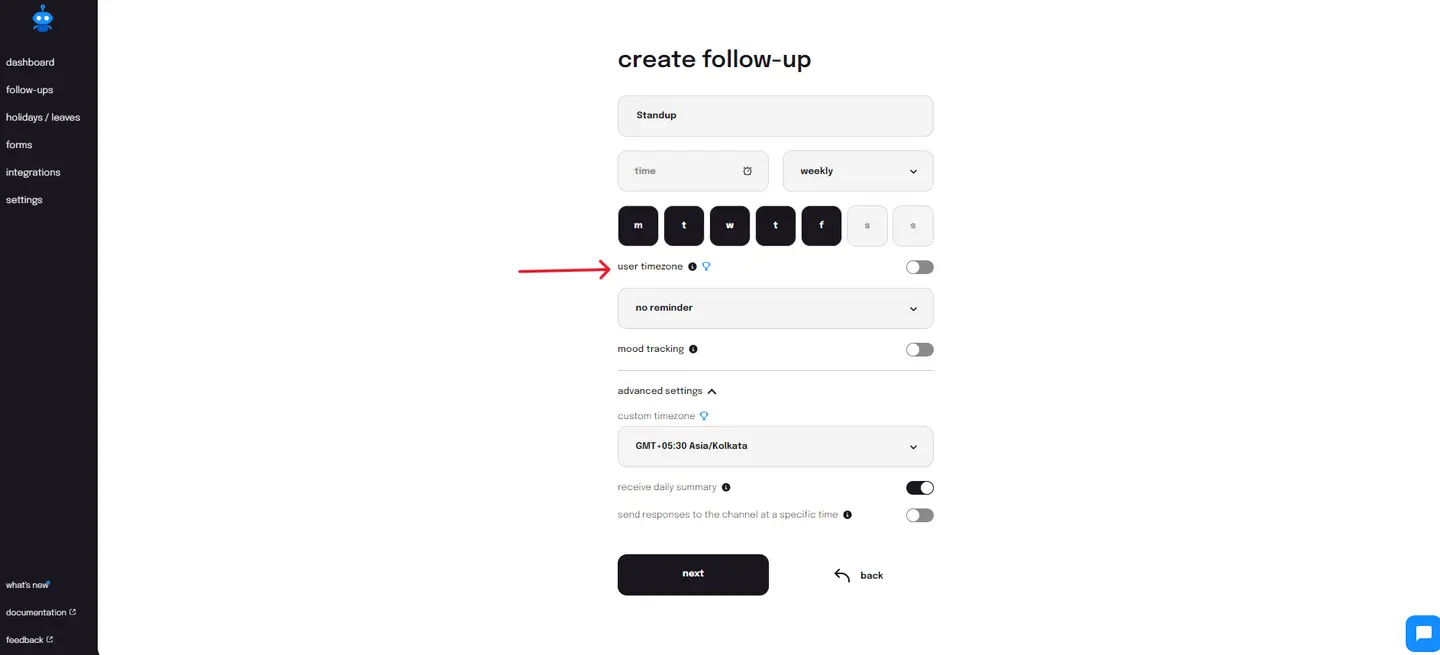
So, select this feature while creating the retrospective follow-up on Sup and make it convenient for your team members to respond to it at the scheduled time but in their respective timezones.
b) Scheduled reminders
Traditional retrospective reviews, be they physical or virtual, come with the pressure of immediate responses. This may prompt your team members to provide answers that are not well-considered but merely an expression of their experiences that lack depth and significance. Asynchronous retros allow your team members to contribute meaningfully to the retrospective meetings at their own pace. I know what you are thinking-what if they take a lot of time and even forget to answer?
Sup anticipated this and came up with a solution that allows you to automate reminders for the planned retrospective review, ensuring your retrospectives receive responses that are valuable to the team.
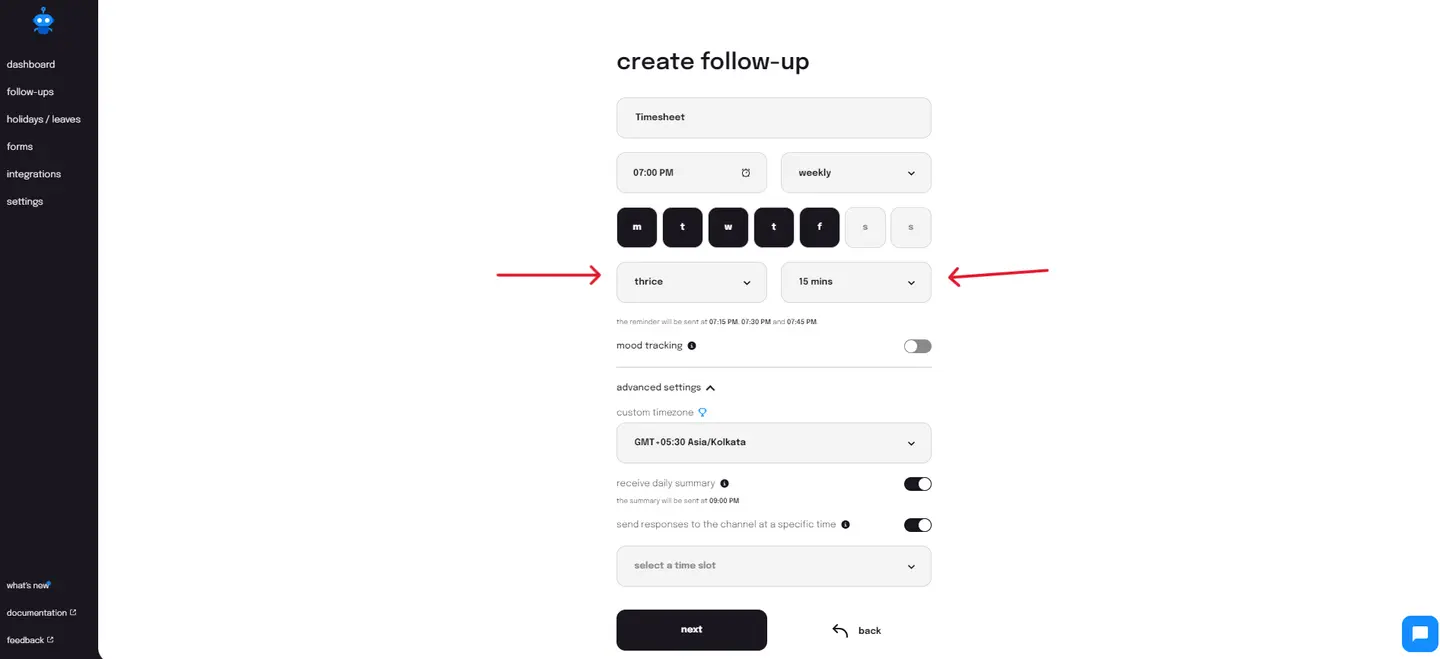
As shown above, it allows you to set the frequency of reminders as well as the time intervals after which you'd like to send them. As a result, you always receive responses, but never ones that are only half-baked.
c) Custom reminders
Just in case you think your team receiving a reminder from you will be more effective than automated ones, or for those occasional times when some team members somehow end up missing the automated reminders, you can send reminders manually.
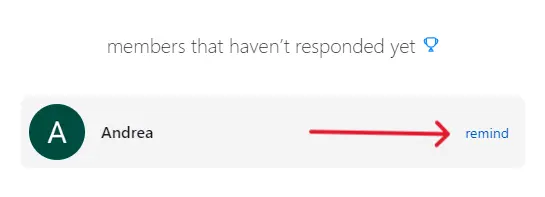
As shown above, with Sup's custom reminder, you can select team members who have not yet responded to the asynchronous retrospective meeting and send a reminder to do the same manually.
2. Select the meeting participants.
Traditionally, you would decide on a time and place and then select the participants for the retrospective meeting. Now, because it is a retrospective meeting, you would want input from all. So, you'd include all members of the team. The problem with inviting all your team members to a physical or virtual meeting is that it would take the meeting too long to finish, with most participants losing focus over time.
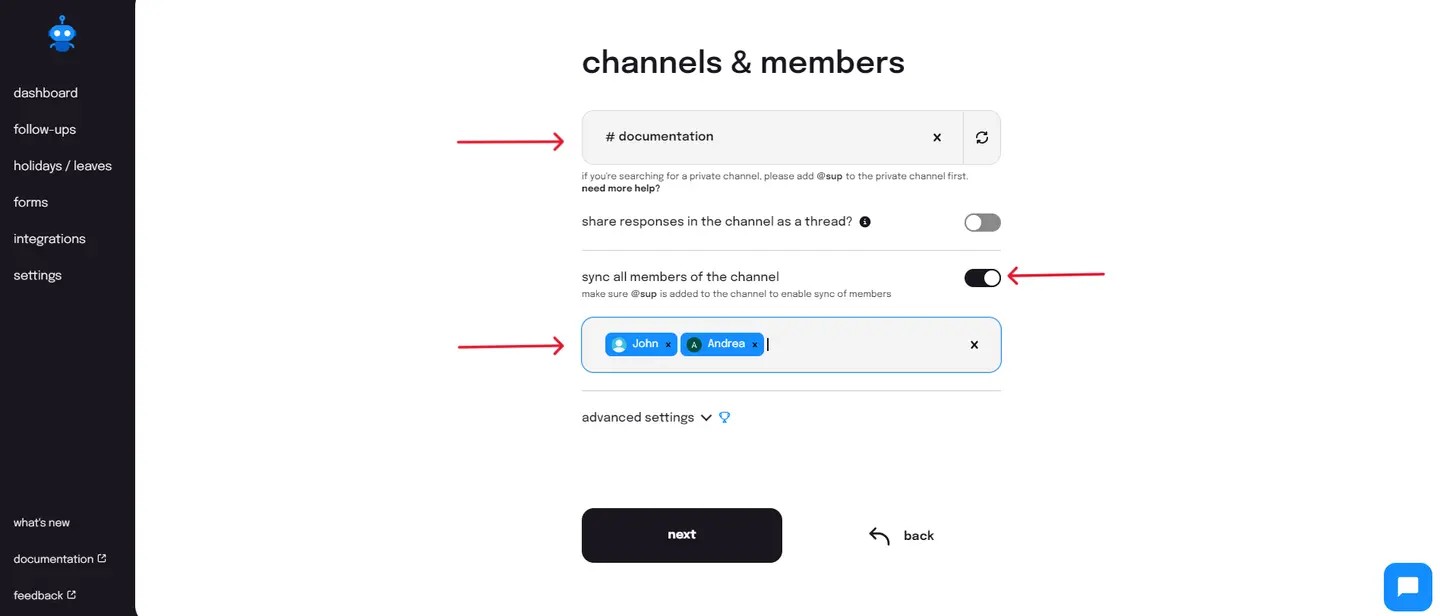
So, do you reduce the number of participants? No, you conduct the meeting in a way that ensures that you have a productive and worthwhile meeting even with everyone in attendance. How? By choosing Sup to send out asynchronous retrospective follow-ups in Slack, the Sup bot facilitates asynchronous, text-based retrospective meetings on Slack, ensuring that participants can retain all shared information.So, send out a retrospective using Sup in Slack in the following ways:
- You can create a channel on Slack for your required meeting participants and sync all members of the selected channel to share the retrospective follow-up.
- You can choose individual team members to send the retrospective follow-up to.
3. Select the right format.
Here comes the difficult part: how do you make your retrospectives effective? We gave you a number of options above. Select the format that you think suits your team. You can also choose to rotate the format occasionally to keep the retrospectives fresh and engaging.
However, whatever the format, in a live retrospective meeting, there will always be participants who dominate the meeting and participants who consequently receive less room to share their thoughts. This reduces the effectiveness of the meeting. While it isn't possible to always expect or train people to speak in a manner that leaves room for others, what you can do is run the retrospective meeting in a way that accommodates all - by running your retrospectives using Sup in Slack. The asynchronous nature of these meetings ensures that everyone has an equal opportunity to express themselves and a space to contribute in the best way they can.
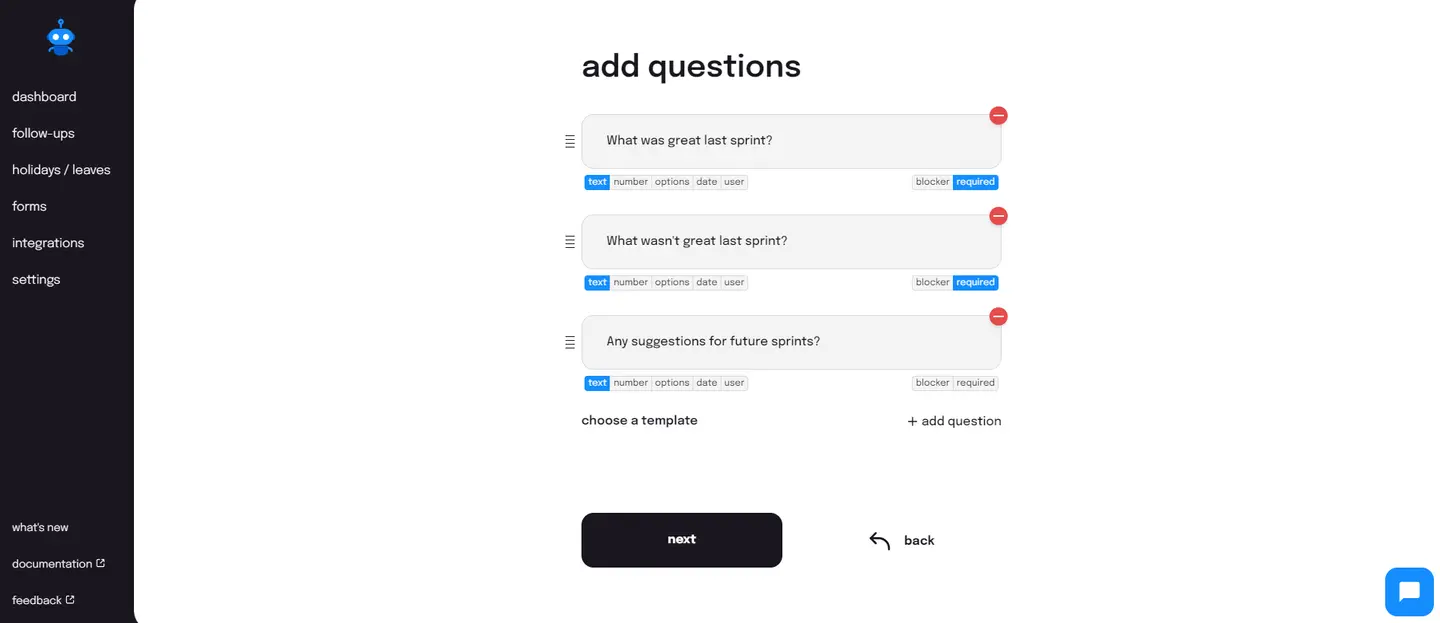
To achieve this, simply select the format you want to run and type in the related questions you want answered via Sup's retrospective follow-up. Add, edit, remove, or change the question type as you want, as shown below.
4. Gather data to generate insights.
Usually, when a retrospective meeting is conducted, there is no record of the answers or the discussion that took place. The answers that are written on sticky notes, too, can easily get misplaced.
But with retrospective reviews using Sup on Slack, you have a record of all the responses to go over as many times as you can. We store this data to prevent its loss. You can retrieve it easily for any future reference.
In closing
I would like to reiterate the importance of holding your retrospective meetings. Decide on a regular meeting schedule, but hold them regularly. Don't skip it, even if there are only a few items to discuss. New things and ideas can always come up that can turn around the way you work. So get better to create better!