
Slack has changed the way the professional world communicates today. Although quick, WhatsApp was too informal, and although formal, emails were too slow. Slack took advantage of the best of both worlds and turned out to be the most preferred option for professional communication.
So, it isn't surprising that, in its quest to become the do-it-all app, Slack allows itself to be integrated with various other apps. One such category of app it integrates with is Slack Standup Bots. The sheer number of them is overwhelming. But are they all affordable?
Here, we bring you a breakdown of the top affordable Slack daily standup bots: Sup, Standup Jack, My Check-ins, and Standup Alice.
Come on, let’s have a detailed look.
How do I select the right Slack daily stand-up bot?
Before we dive into the details of each Slack standup bot, let's first understand what the parameters are that we must judge a standup bot by.
a) Affordability
First things first. Money matters. This is why affordability must be the first criterion you judge a Slack stand-up bot by.
Any stand-up bot you buy makes responding to the daily stand-ups quick for your employees. This results in your employees dedicating more time to productive work. A stand-up bot, therefore, is an investment you make.
But would you also need to check if the standup bot aligns with the financial numbers you are willing to allocate? Yes. So, here are a few questions you could ask yourself to help you go ahead with getting a Slack daily standup bot.
- 1.What is my budget for buying a Slack stand-up bot?
- 2.Does the price of the stand-up bot justify the features it delivers?
- 3.Have I explored other Slack daily stand-up bot options that offer similar features?
b) Features
This probably should have been the first criterion, but can we deny the importance of the money we are willing to part with? Nevertheless, the second immensely crucial parameter to judge a stand-up bot by is its features. Needless to say, it is because it tells you exactly how it is going to help you reach the goal you wish to achieve.
Some questions to help you with this:
- 1.What can the stand-up bot do?
- 2.Do its features align with the needs of my team or organization?
- 3.What degree of efficiency does the Slack standup bot add to the workflow?
- 4.Does this Slack daily standup bot offer customizations?
c) Customer service
Ah, the criterion that can make or break the user experience for the best standup bots. How many times has it been that you were waiting for a technical glitch to get fixed when you needed that app the most? Quite a few times, right?
The quality and pace of response that you receive from the support team during this time will determine whether or not you will continue with this tool or look for alternatives with better customer support.
A few questions you could ask yourself in this regard:
- 1.Does this Slack stand-up bot offer customer service?
- 2.What is the average response time of the stand-up bot?
- 3.Are there user guides available to help first-time users?
1. Sup Bot
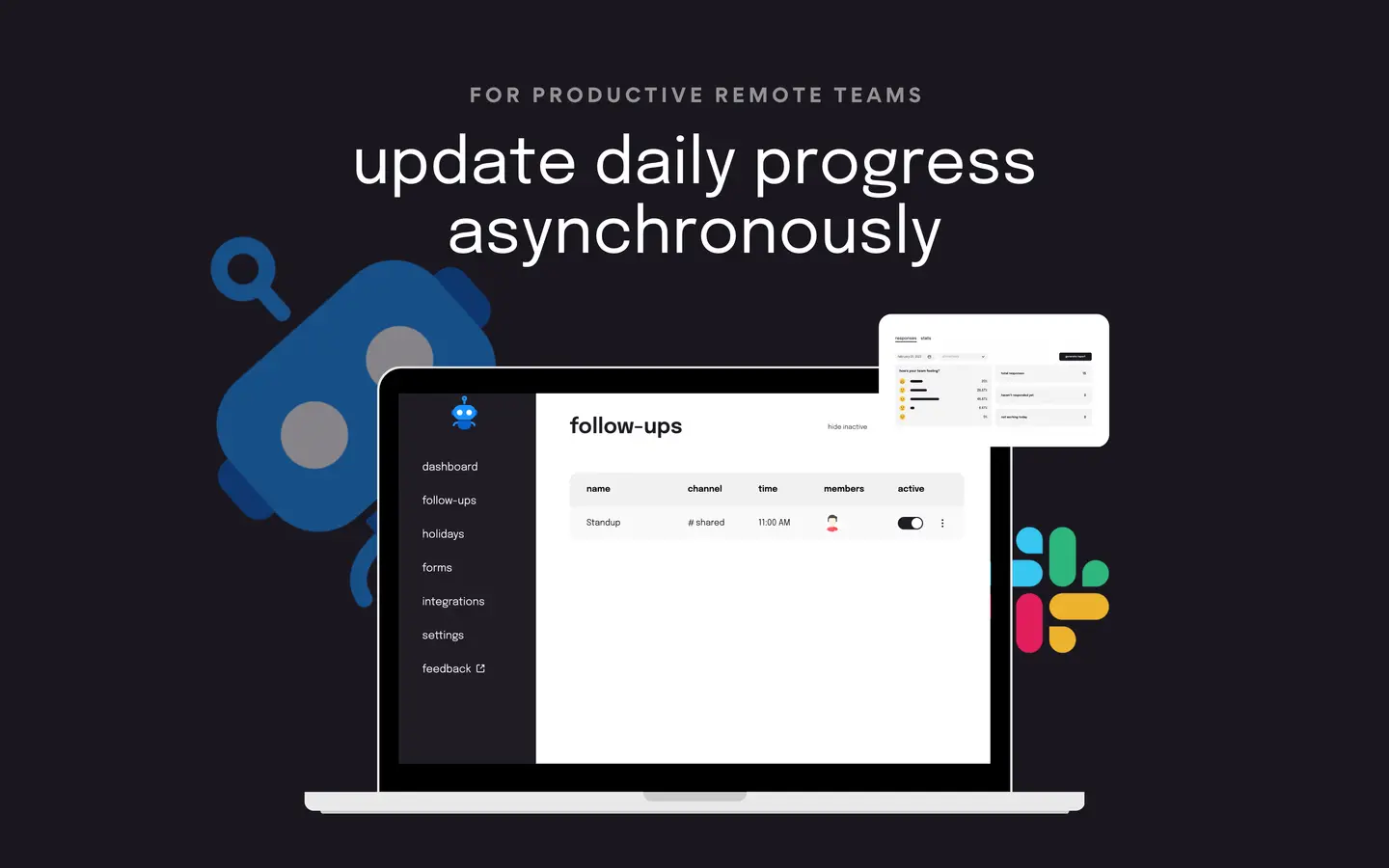
Sup Bot is the Slack daily standup bot you should go for if you want all the boxes checked on your checklist for the best affordable Slack standup bot in 2023. Let's see why.
a) Affordability
When it comes to pricing, there is no Slack stand-up bot that beats Sup. This is because Sup allows you to avail of its features at a price that covers your entire team.
So, if you have a team of up to 250 members, you get access to all the Pro features of Sup at a flat price of $29 per month and the Premium features at a flat price of $49 per month. What more? The rates get subsidized further if you avail yourself of its annual plans.
Sup also offers a free plan that gives you one active follow-up for 15 members. Find all the details here.
 Add to Slack
 Add to Teams
 Add to Webex
b) Features
Sup, as a standup bot, offers varied features. Let's take a look.
- Interaction Type Choice
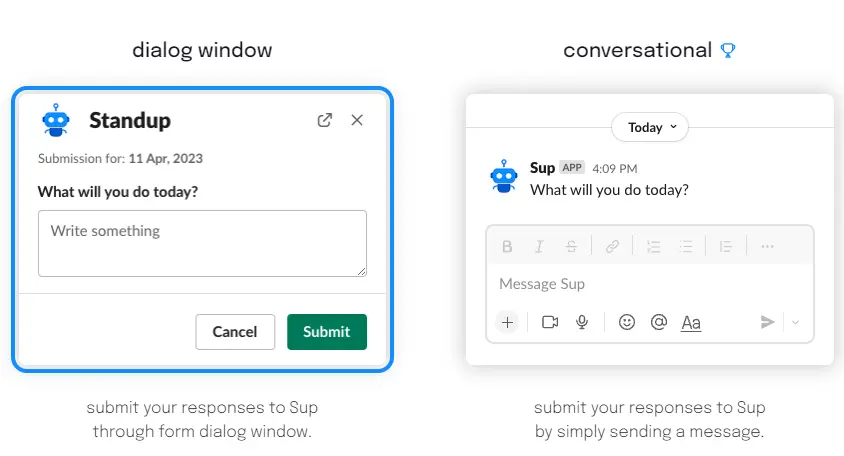
You will not find any standup bot that offers you a choice of interaction type at this price. But what choices, exactly? Well, even before you start setting up the days and times for your daily stand-up, Sup asks you to choose between a dialog box interaction type or a chat-based interaction type. How are these two different?
The dialog box interaction type lists before you all three standup questions for you to answer. So you go all type, type, type. And the chat-based interaction type, on the other hand, shares with you the questions one by one but allows you to format your text as per the available options on Slack.
- Custom Timezone
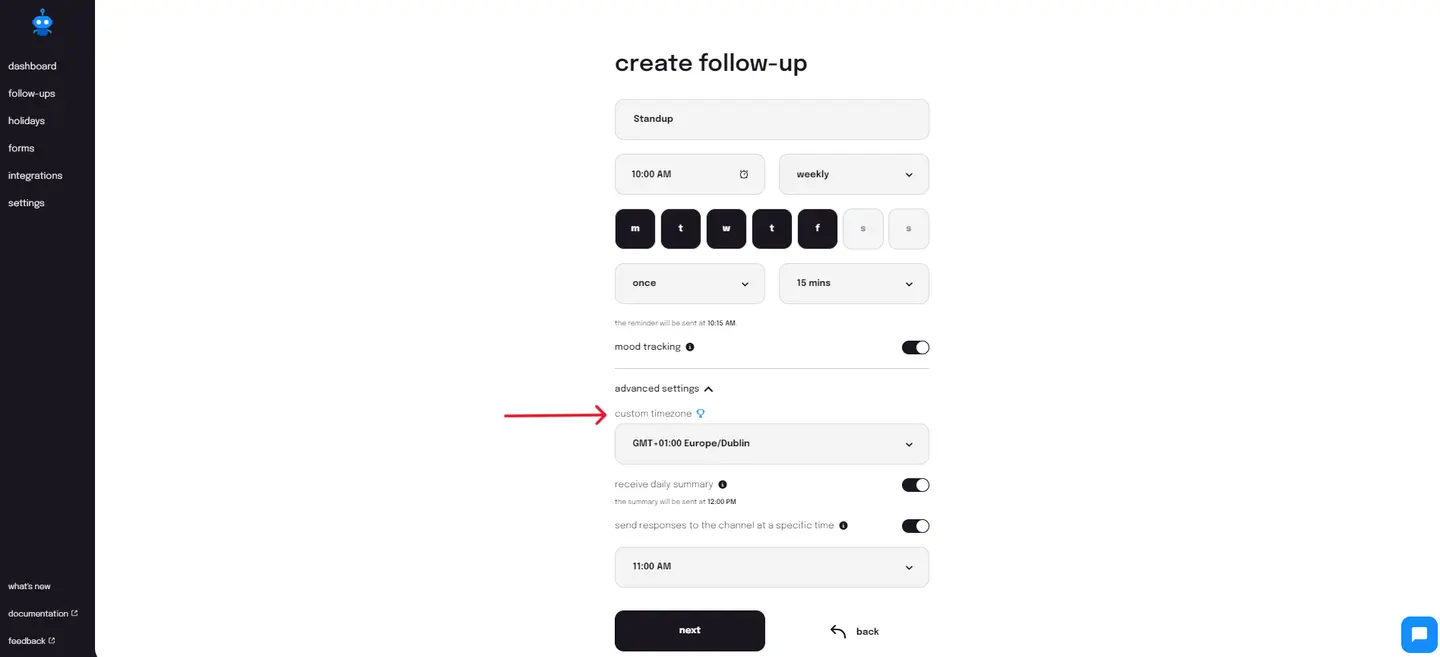
The next best feature that you will find in Sup is the custom time zone. This is helpful for organizations that work with employees from different time zones.
Now, hiring across continents isn’t enough. Ensuring that you provide your employees with the right environment to work in matters too. And this includes respecting their time during work.
Jim from Toronto is not going to appreciate it if you have a standup at 3 p.m. in his local time. He is probably engaged in work then and will have to break his focus to join a meeting that is convenient only for others.
The custom timezone in asynchronous standups from Sup eliminates this inconvenience for others like Jim, so that you can have a team that is both accountable and productive.
- Mood Tracking
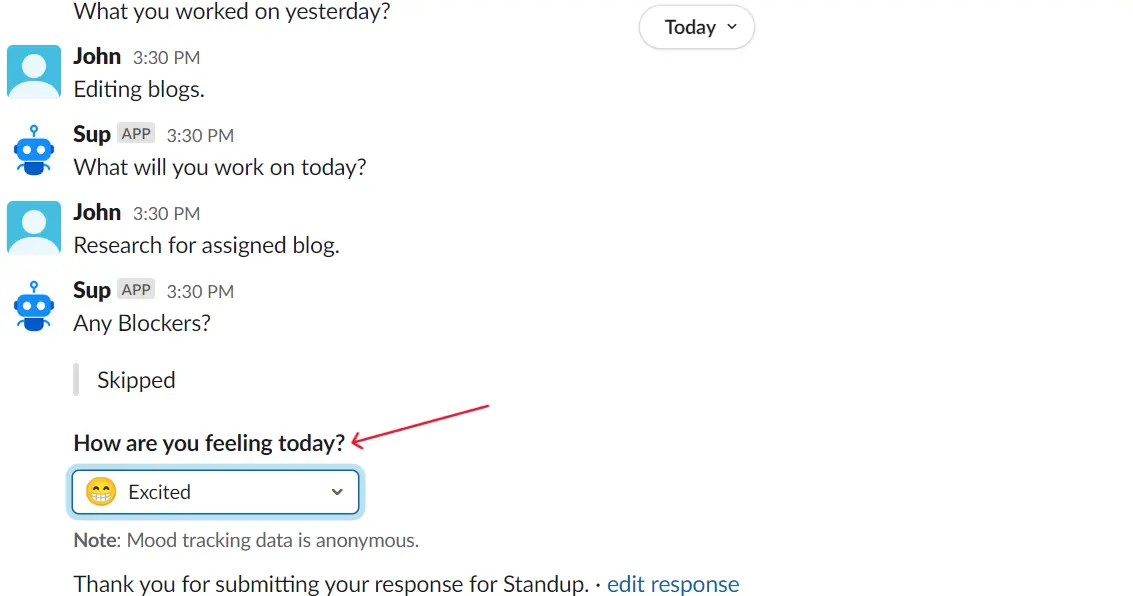
If there is one way you can level up your Slack standups, it is this: a mood tracker. The mood tracker from Sup allows you to keep a tab on your team's mood and take action accordingly. You can view the metrics on the Sup dashboard to find which weekday would be right to start a project and which weekday the team would need a fun activity to feel rejuvenated.
You can do this by integrating the mood tracking feature into your Slack stand-ups. The daily standup summary report comes with the average team mood for the day. It shows you an indicative emoticon as well as a score out of 5 to give you a clearer insight into team spirit.
What can be better? The fact that the mood tracking feature receives responses anonymously means that you can rest assured that your team members are answering honestly.
- Detailed analytics
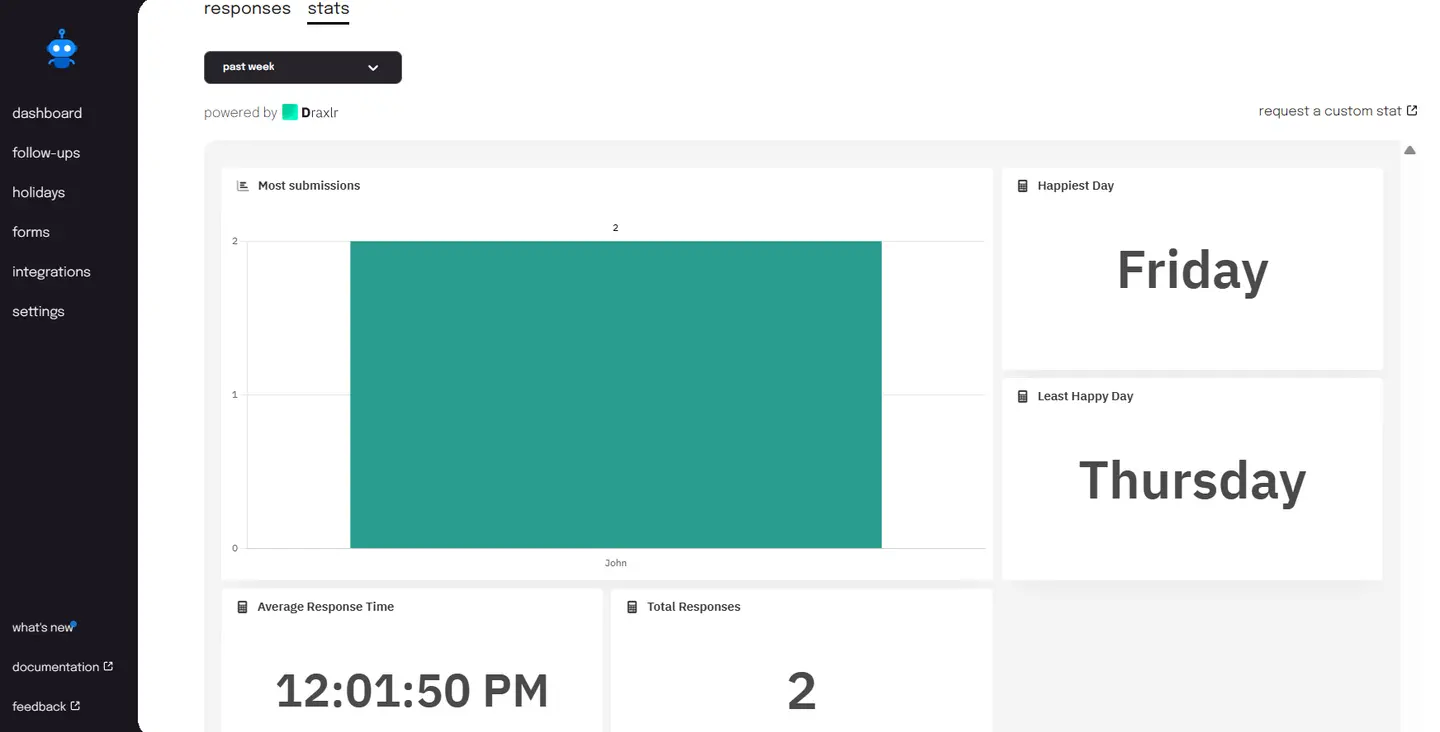
So, your team has answered the Slack daily standup bot. What do you do after? Isn't it helpful to have access to data and insights other than just the answers your team members typed in?
Sup gives you that and more. You can view the standup participant with the most submissions (the one who is most accountable and transparent with his work), the happiest day (the day your team is likely to be most productive), and the least happy day (the day HR needs to wrack their brain to infuse some energy into the team), among others.
To add to this, Sup also offers you access to a custom stat. This is where you can request a specific stat that you wish to use to understand your team better.
- Customizations
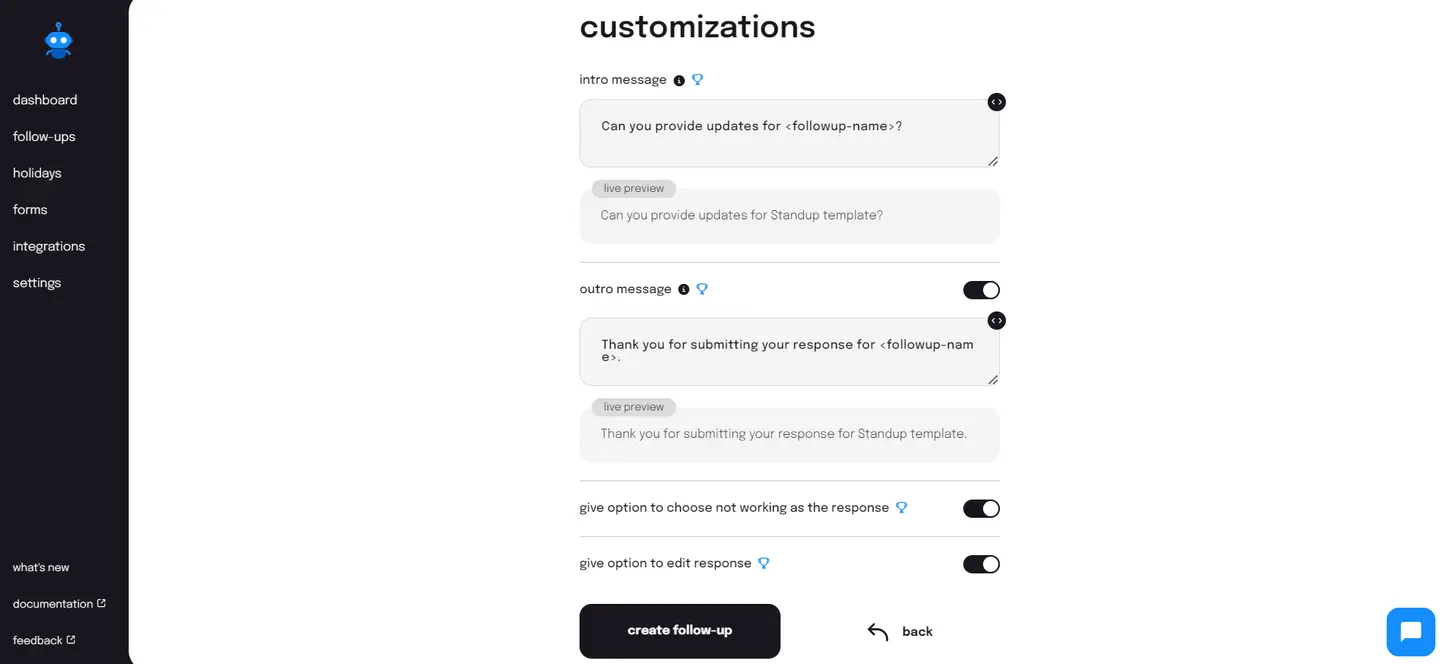
Yes, a simple Slack standup bot is all you might need for your daily standups. But wouldn’t it be nice if you could tailor your daily stand-ups the way you wanted? Customizations from Sup let you do that. The daily stand-ups from Sup offer a number of customizations.
You can tailor the question type for your daily standups. You can choose if you want the answers to be in text, number, options, date, or user.You can send out customized pre-submission and post-submission messages for your standups. If you'd like, you can even disable the post-submission messages.
- Access Control
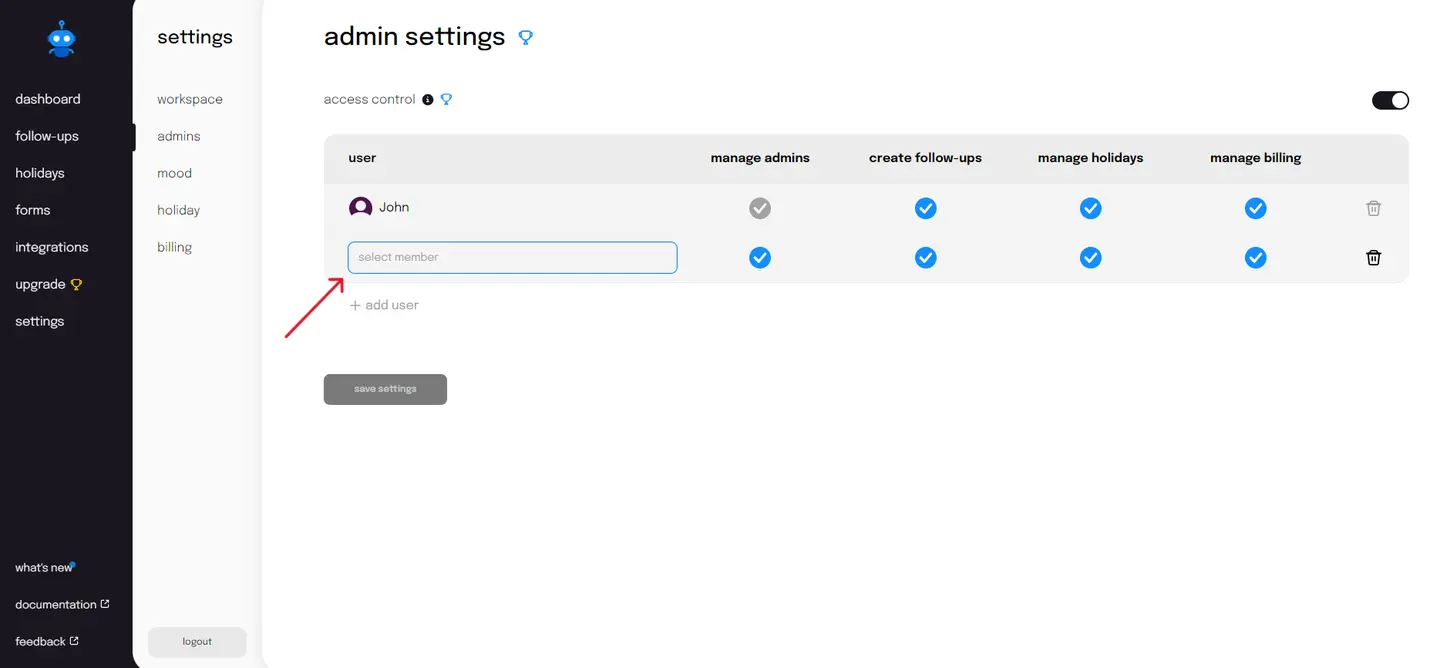
Who do you think must be able to create stand-ups? Consequently, who do you think must be able to edit and view the responses? Would you want to take charge or delegate it to others? Sup lets you control who has access to this and more.
With the access control feature, you will be able to add users to grant them access to manage Sup's core feature, follow-ups, among others. This ensures that both the control and data of the stand-ups lie only with the hands you trust. Find more details here.
c) Customer service
With great power comes great responsibility. Sup understands that, and this is why, besides offering the best of features, it offers an excellent customer experience. You can find a chatbot both on the website and in the app interface for all your support. The average response time can be measured within 24 hours. What more? You can even find simple user guides for each of its features documented here.
2. Standup Jack
The second Slack standup bot we are going to be looking at is Standup Jack. This stand-up bot is unique in its own way. Let's take a look.
a) Affordability
You can avail yourself of Standup Jack for free for a maximum period of 14 days. After this period is over, you will need to upgrade to the paid plan, which is priced at $1 per user per month, or it will go into hibernation.
Although it is an affordable option, the drawbacks are that it does not have any more packages to choose from or a free plan to continue on.
b) Features
Standup Jack gives you all the features that any Slack stand-up bot will give you. So, what's different? The one unique feature that Standup Jack offers is that it does all of this on Slack. This means that there is no webpage to go to. You create and edit your Slack stand-ups on Slack itself.
However, Standup Jack comes at a cost when it comes to reports and customizations. The standup bot does not offer you any of this, and neither do you have access to any mood tracking feature.
c) Customer service
You can contact customer support by typing a simple command to Standup Jack on Slack. The website also has an FAQ section where it answers queries that you might have regarding its features.
3. My Checkins
The third affordable Slack standup bot we will be talking about today is My Checkins. How affordable is it, exactly? Let's take a look.
a) Affordability
My check-ins come in three packages.
- The free plan covers a team of 25 users at most.
- The growth plan at $50 per month can accommodate a team of a maximum of 100 members.
- The enterprise plan tailors its quotes according to your team size.
b) Features
The features that My Checkins offers again are not very different from what you would expect from a simple Slack daily stand-up bot, apart from the filters that you can use to sort out standup responses.
However, it has introduced something that can entice users into using it: summarising responses using AI. A new attempt at best, this feature seems redundant when all it offers is a basic summary of individual Slack standup responses in the text when you can already view it in a clearer manner in a tabular form.
c) Customer service
The My Checkins webpage has a section where you can contact its team for any support or feedback. However, it does not offer any user guides aside from a 3-step guide on how to set up a daily standup on its website.
4. Standup Alice
The fourth software on the list is Standup Alice. Do you want to know why this was added to the list? Read on.
a) Affordability
Standup Alice, too, comes in three packages.
- The basic plan accommodates four users at most.
- The pro plan comes at a price of $1/user/month.
- The enterprise plan offers custom pricing.
b) Features
Standup Alice offers simple standup bot features, which is indicative of the price. To make things interesting, it offers customizations in the form of various question types.
However, it must be integrated into a Slack channel first, unlike all the other Slack standup bots we have spoken of so far. Moreover, it does not allow you to send custom reminders or customise the pre-submission and post-submission messages to your standups.
c) Customer service
It has a dedicated support section on its website. You will also find contact information on the website in case you wish to reach out to the team for support or feedback.
Conclusion
It is up to you to select the right Slack daily standup bot for your team. Go grab the marker, pan yourself out on the whiteboard, and chalk out the pros and cons with regard to affordability, features, and customer service. Go on, we aren't looking. I wish you good luck!