
How many times have we heard individuals working in the corporate world say that they are exhausted? If I'm being completely honest with you, it is acceptable for them to express their dissatisfaction. It is possible that people are putting in extra hours just to finish the tasks that they have been given, or it is also possible that they have been working the standard 9 to 5 schedule for an extended period of time, such as two months. In that case, what exactly is it that we would recommend to those people? A vacation. It could be a weekend gateway or a long holiday.
Clearly, prior to taking a vacation, you must obtain the managers' permission. Once that is accomplished, you must zone out from the work. You must stop worrying about your team's ability to function without you and check the final Slack message. And in this blog, I will explain how you can accomplish this while you are out of the office.
Why set Slack out of office status?
When we are working together as a team remotely, it is absolutely necessary for everyone to be aware of our availability. You are required to let everyone know that you are unavailable if you want to take a lunch break. This ensures that no one will continue to ping you or get the impression that you did not respect them enough to respond to their messages.
Similarly, when you are going on vacation or taking any other type of leave, you will inform your manager and receive approval, but how would you inform the rest of your team? Suppose you verbally inform them, but there is a chance they will forget and expect you to be available to answer their questions. Setting a slack status would save you from these.
When you set out-of-office status in Slack, other users will be able to see it when they search for your username in a channel or when they initiate a private chat with you. You can't stop people from texting you, but you can let them know that you can't answer their questions right now by updating your status to reflect that you aren't immediately available to do so and that they will have to wait.
Enough of my rambling; let me show you how to update the slack out of office status.
How to set Slack out of office status?
Configure manually.
To begin, open the Slack app and navigate to the top right corner where your profile picture or avatar is displayed. Click on it. You will see an option to Update your status; you should click on that option.
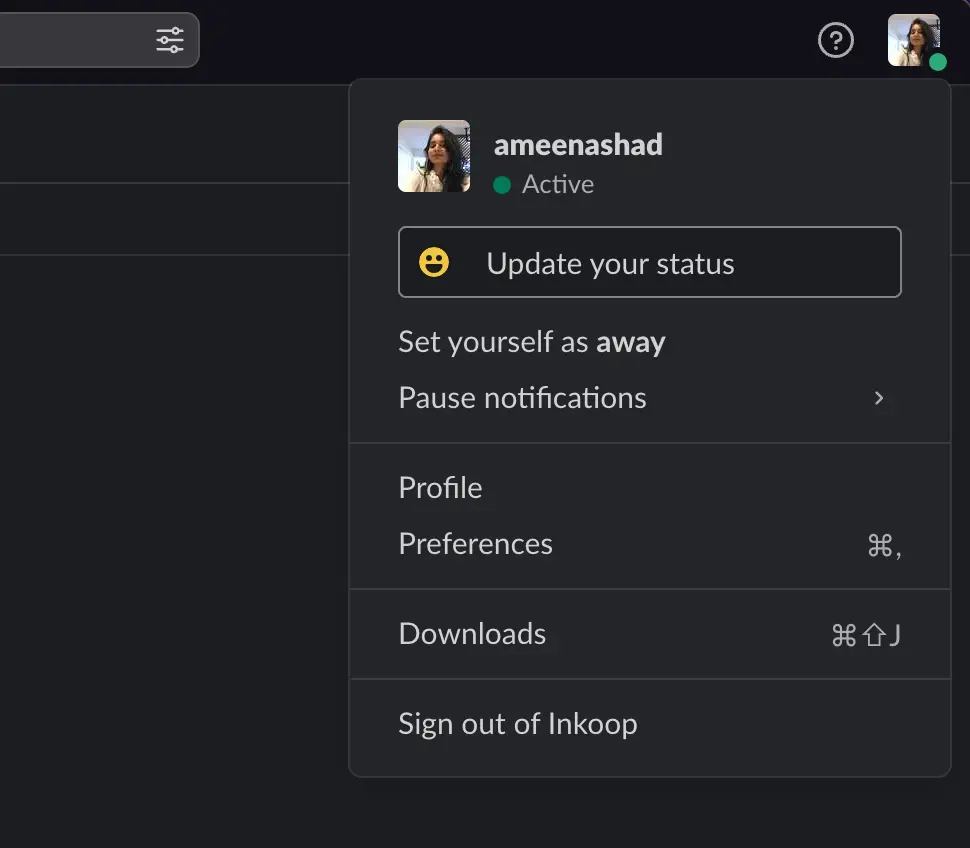
After clicking Update your status option, the default set of slack status options will be displayed. You can choose the appropriate status to add. If you are going on a one-day trip and wish to add a status, consider selecting Away and setting it for that day.
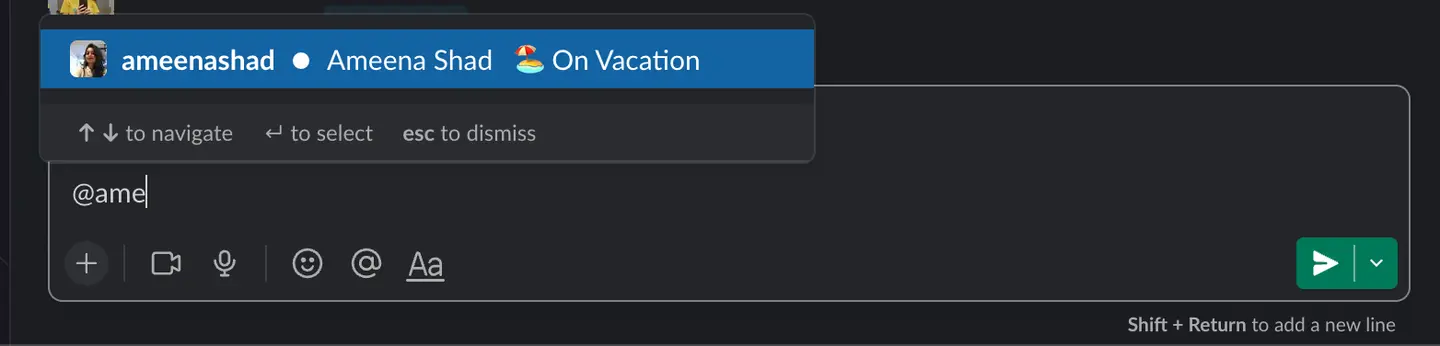
Alternatively, you can personalise your Slack status and make it more obvious to others. I'm on vacation, as I mentioned below. Now, whenever you add a custom text, the icon that will appear as the default option is a 💬 speech bubble. Nevertheless, you have the ability to alter that and choose for how long you want the slack OOO status to be displayed.
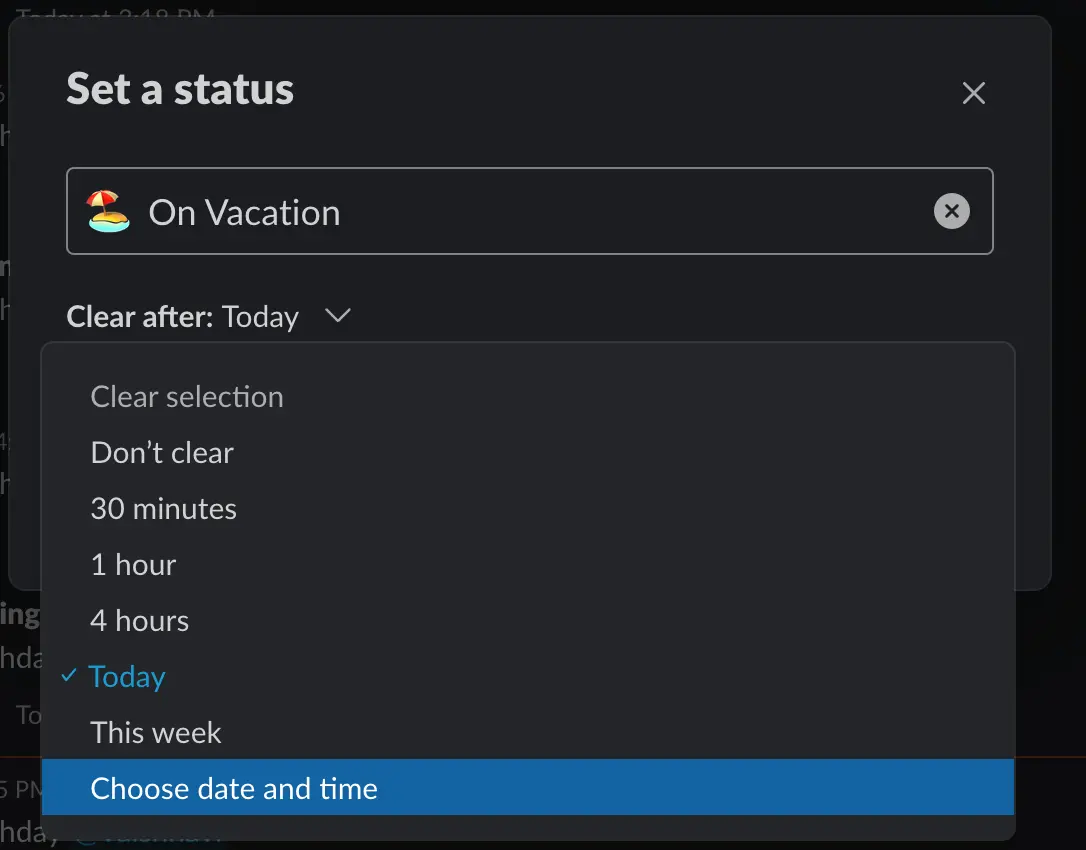
Now, whenever someone attempts to tag you, they will see your vacation status and understand that you will be unavailable for the next couple of days.
Use Sup Bot to plan your next getaway.
In this section of the blog, I'm going to explain how you can simplify the process of requesting time off by utilising a holiday tracking app like Sup. You can also use this app to set your out of office status on Slack, so it serves a dual purpose.
 Add to Slack
First, let's talk about some of the reasons why your company might want to use a vacation tracker like Sup.
- 1.Smoother approval or denial of holiday requests: With an online vacation tracker, holiday interaction would occur between the individual who is taking vacations and the individual who has the authority to approve or reject. There is no back-and-forth regarding holiday requests due to the absence of HR involvement in the approval process. When a request is made, the manager is notified and decides whether to approve or deny it. And once the action has been taken, the team member is notified about the holiday status.
- 2.Enhanced transparency and decreased favouritism: Because the approval process takes place on the app in real-time, there is a record of every holiday request that is submitted. In the event that any holiday is omitted, there is an explanation available for why it was omitted. As a result, the chances of there being fairness are increased, while the risk of there being bias or favouritism is decreased.
- 3.Cost savings and manual labour reduction: If your team consists of more than 50 members, your HR department will receive a flood of holiday request messages regularly. And as the number of team members increases, the difficulty increases. There is a possibility that you will need to retain a single human resources representative solely for holiday processing. An online bot, such as Sup, that is not only used for vacation tracking, but also for running asynchronous daily standup or to run survey forms, is a cost-effective alternative to the HR representative. Consequently, HR would be able to be more productive in other areas of the organisation.
Now that we have a general understanding, we can dive into the Sup process for holiday approvals.
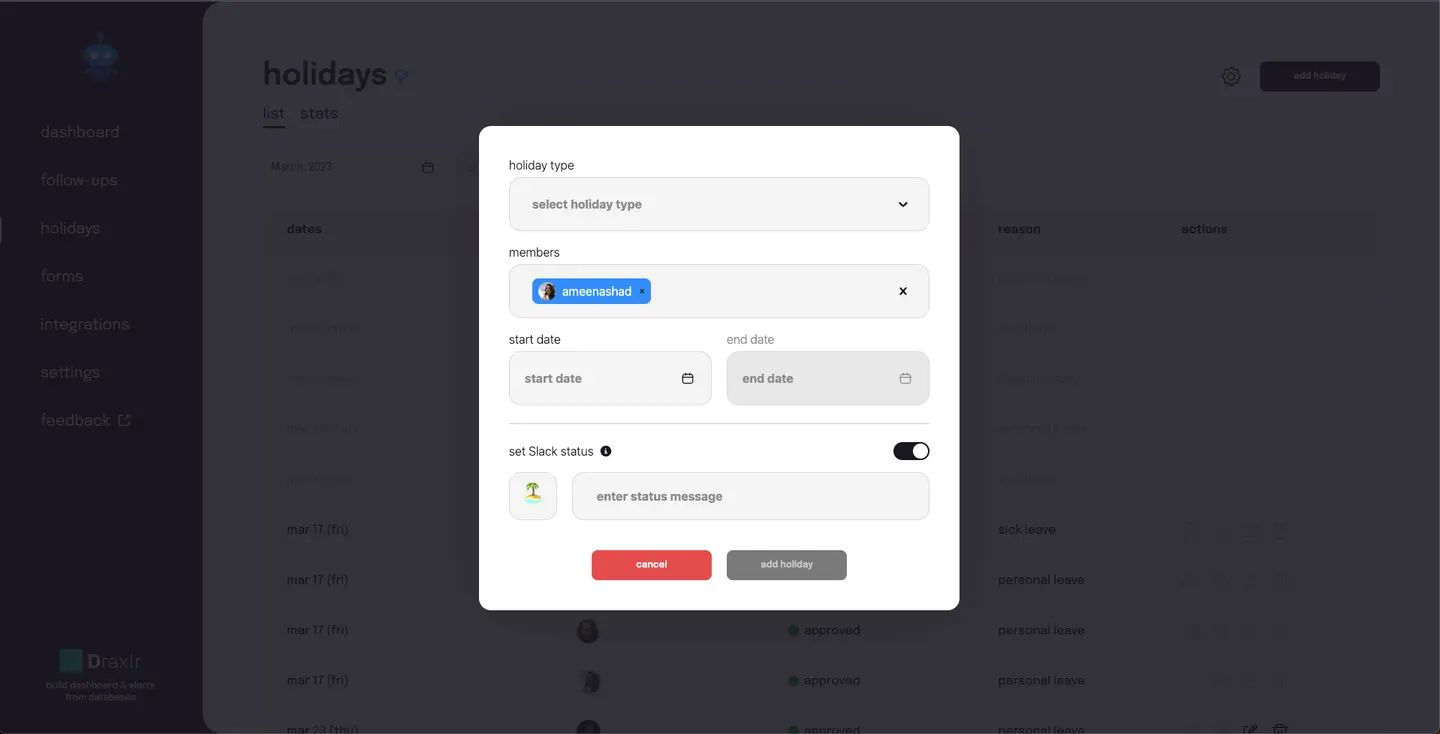
- The first and foremost thing is to obviously install Sup on your Slack workspace. And once that's done, head over to the Holidays tab from the sidebar and click on the create holiday button to fill out your details.
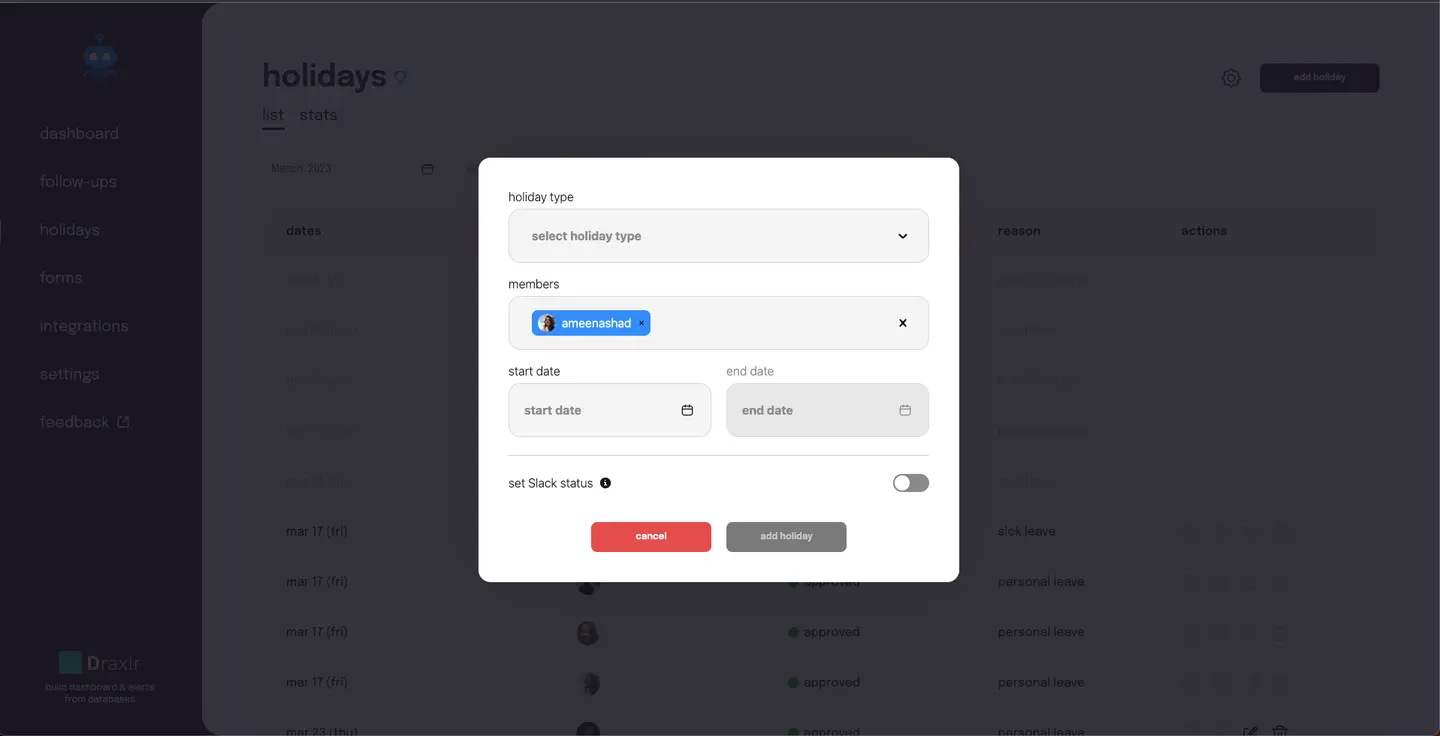
- Now comes the part where Sup takes care of adding your Slack status to your account when you add your holiday request. Turn on the toggle set Slack status and add the emoji and status message you want to set. And that's it! Your status will be changed on the days you asked for time off.
- The manager receives a notification on Slack about the holiday request and decides whether to approve or deny it. Once the action has been taken, a notification is sent to the team member regarding the status of their vacation request.
- Sup also sends a notification on the channel when a holiday is approved and notifies everyone on the last working day of the week about the following week's schedule and who is on vacation.
As you can see, the process is more streamlined with Sup, and there is no in-between decision. Since only the manager and team members interact, the holiday approval process will be efficient. This enables employees to understand their vacation entitlements and plan accordingly.
Get a handle on your incoming alerts.
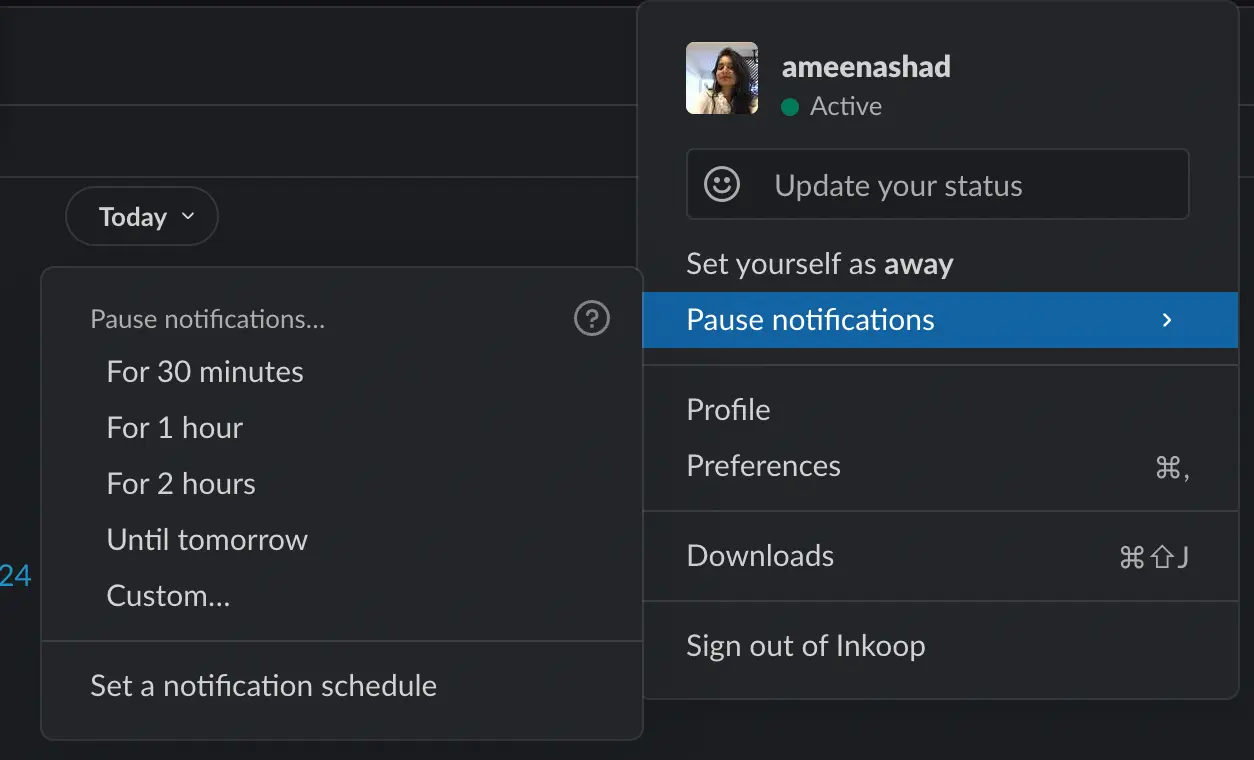
The greatest obstacle has been overcome now that people are aware that you are unavailable due to your Slack out-of-office status. If you so choose, you can pause your notifications. This allows you to disable audio, vibration, and visual alerts.
Pausing notifications in Slack when away from work is something a lot of people prefer doing for various reasons. Like:
1. You will receive all notifications at once, preventing you from missing any crucial information. There is a possibility that you may fail to respond to messages pertaining to crucial discussions after viewing them while you are on holiday.
2. If you can avoid distractions while on vacation, you may find that you are more productive when you get back to work after the holidays.
So, how do you do it? Just go to the notifications tab in Slack and set the time when you don't want to be bothered by notifications.
Conclusion
Maintaining boundaries, preventing interruptions, promoting respectful communication, and letting others know when you are not available are all important reasons to set an out of office status on Slack And with Sup Bot holiday tracker, you can set it and forget it-just like those tacky '90s infomercials! But seriously, take a load off and let Sup do the work for you.
Frequently asked questions
1. How to set ooo status in Slack?
You can set an out-of-office (OOO) status in Slack manually by clicking on your profile photo, selecting "Set a status," and choosing or writing an OOO message. Alternatively, you can use a tool like Sup Bot to automate setting your OOO status based on your calendar or predefined schedules.
2. How do I update my leave status in Slack?
To update your leave status in Slack, click on your profile photo and select "Set a status." In the status window, type your leave message, add an appropriate emoji, and set the dates for your leave. You can also customize the duration for how long the status should be displayed. Additionally, if you are using an integration tool like Sup Bot, it will automatically update your status based on your leave schedule, ensuring that your team is aware of your availability without manual input.
3. How to apply for leave on Slack?
To apply for leave on Slack, first, check if your company uses any specific Slack integrations or bots for leave requests, such as Sup Bot. Notify your manager by sending a clear and polite message in Slack, stating your leave dates and the reason if necessary.
4. Can you set Slack status in advance?
Yes, you can set your Slack status in advance using various methods. While the Slack app itself does not support scheduling status updates for future dates directly, you can use Slack leave tracker integrations like Sup Bot, which provide the ability to schedule status updates in advance based on your calendar or predefined schedules. Additionally, integrating Google Calendar with Slack allows your "Out of Office" events to automatically update your Slack status during those times.
5. How do I indicate PTO in Slack?
To indicate Paid Time Off (PTO) in Slack, click on your profile photo and select "Set a status." Enter a message like "On PTO" or "Out of Office," choose an appropriate emoji, and set the duration to cover your PTO period. You can also use Slack integrations like Sup Bot to automate this process. Additionally, notify your manager and team members about your PTO in the appropriate channels.