

Year-end leave planning can get complicated when multiple employees request the same dates, unused PTO balances need attention, and managers are trying to maintain enough coverage during the holidays. Without a clear process, overlapping requests and last-minute changes can quickly turn December into a scheduling challenge.
When leave requests, remaining PTO balances, public holidays, and staffing requirements are managed separately, it's easy to miss scheduling conflicts. Managers may approve time off without realizing how it affects team availability, making it harder to arrange coverage when it's needed.
The goal of year-end leave planning isn't to limit time off. It's to help employees enjoy their holidays while ensuring essential work continues without disruption. With clear guidelines, early communication, and better visibility into team availability, the process becomes much easier to manage.
This guide covers how to set realistic leave deadlines, handle overlapping requests fairly, manage unused PTO, and plan holiday coverage. We'll also look at how Slack and tools like SUP!'s PTO tracker can help teams organize leave requests and keep everyone informed.
Why Year-End Leave Planning Gets Messy
December creates a particular kind of scheduling problem. Everyone's requests are reasonable on their own, but collectively, they can leave a team short-staffed.
A few things tend to happen at once:
- Popular dates overlap. Employees want time off around Christmas, New Year, school holidays, or family celebrations.
- Unused leave comes into focus. People realize they still have PTO to use, especially if their company's policy limits carryover.
- Different locations have different holidays. A distributed team might have employees observing entirely different public holidays.
- Approvals happen without enough context. A manager approves a request without realizing two other team members are already away.
- Coverage gets discussed too late. Nobody assigns a backup until the person responsible is about to log off.
The biggest mistake is treating each request as an isolated decision. A manager needs to see how the request affects the rest of the team, not just whether the employee has enough vacation days.
Here's how to build a process that makes those decisions easier.
1. Start in October, Not the Week Before Christmas
If your first conversation about December leave happens in December, you've already lost most of your scheduling flexibility. October is a useful starting point for teams expecting a busy year-end period. It gives employees enough time to plan and managers enough visibility to identify potential staffing gaps.
Decide when requests should be submitted
Pick a reasonable deadline for planned December leave. For example, you might ask employees to submit their holiday requests by November 15. That date isn't a universal rule. Choose one that works for your team's operating schedule, existing leave policy, and local requirements.
The point is to establish a planning window, not create an excuse to reject every request that arrives afterward. Emergencies and unexpected circumstances still need a fair process.
Announce the deadline where people already work
For a Slack-based team, one clear announcement is better than reminders buried across several channels. Here's a message you can adapt:
December Leave Planning Reminder
Hi team! We're starting our year-end leave planning.
If you're planning to take time off in December, please submit your leave request by November 15 so we can review overlapping dates and arrange coverage.
Before submitting, please check your remaining PTO balance and any public holidays that apply to your location.
If you're responsible for critical work during this period, coordinate a handover with your manager before your leave begins.
If you have any questions about leave balances or carryover, please reach out to HR.
Thanks for helping everyone enjoy a well-planned holiday break!
Pin the announcement in the relevant Slack channel and repeat the reminder as the deadline approaches.
Use clear rules instead of case-by-case surprises
Employees should know what happens when requests overlap or staffing is limited. Define your approach to:
- Minimum advance notice
- Dates with critical staffing requirements
- Maximum simultaneous absences, where appropriate
- How conflicting requests are reviewed
- Exceptions and urgent leave
- Who makes the final approval decision
Apply these rules consistently and make sure they comply with your organization's leave policy and applicable laws.
Where SUP! helps: SUP! supports configurable notice rules, blackout periods, and team absence limits. Notice rules can block requests that violate the configured requirement, while team absence limits display warnings for review. Blackout periods can be configured to block requests or show warnings.
These settings help surface policy issues early, but the manager still needs to make fair staffing decisions. A minimum-notice rule also isn't the same as a fixed November submission deadline, so communicate both separately.
2. Get One Clear Picture of Who's Away
Before reviewing December requests, answer a simple question: Who is already scheduled to be unavailable, and when? That sounds obvious, but it's surprisingly easy to lose track when requests are spread across Slack DMs, emails, spreadsheets, and calendar events.
Build a shared view of team availability
Your leave calendar should make it easy to identify:
- Approved leave
- Pending requests
- Half-day absences
- Public and team holidays
- Dates with multiple overlapping absences
The distinction between pending and approved leave matters. A pending request isn't final, but managers should still consider it when reviewing other requests for the same dates.
For example, suppose two employees have approved leave for December 26 to 31, and another two have requests pending. Waiting until all four are approved before examining coverage creates an avoidable problem.
Check the calendar before every approval
Make calendar review part of the approval process. Before approving a request, ask:
- 1.Who else is away on those dates?
- 2.How many people will be available?
- 3.Do the available employees have the skills needed to cover essential work?
- 4.Does the request overlap with an important deadline or public holiday?
- 5.Can coverage be arranged without placing an unreasonable burden on colleagues?
A shared calendar makes the first two questions easier. The remaining questions still require management judgment.
Keep availability visible in Slack
If your team works primarily in Slack, employees shouldn't need to message HR every time they want to know who's away. SUP!'s PTO tracker provides an Overview showing who's away today, a day-by-day view of the current week, upcoming holidays, and personal leave balances.
Its team timeline displays members across the days of a month, with colored leave bars, striped pending requests, and half-day indicators. Managers can use these views to identify overlaps before making approval decisions.
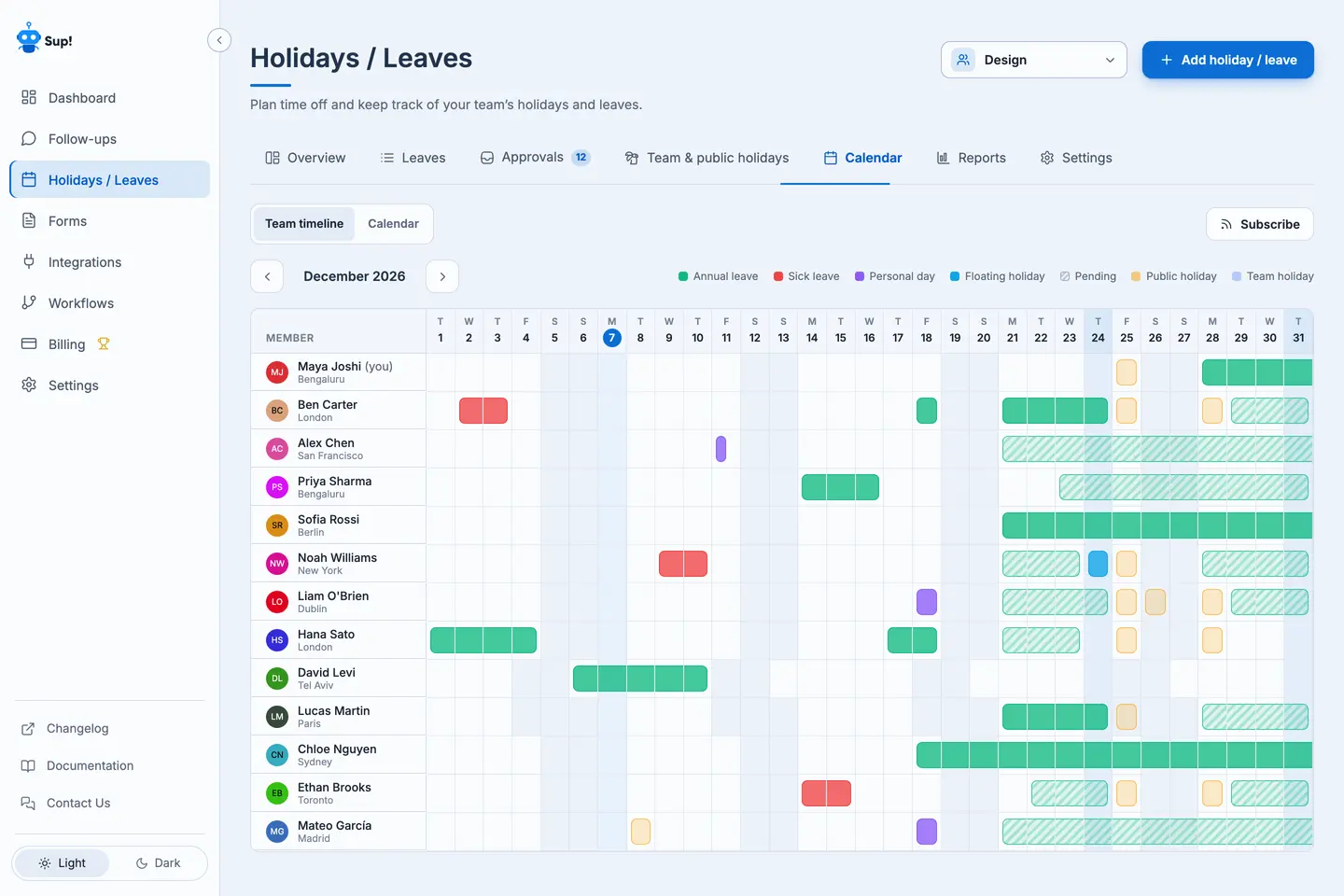
The aim isn't to monitor everyone's vacation plans. It's to give the team enough visibility to coordinate work without unnecessary interruptions.
3. Handle Overlapping Leave Requests Fairly
Overlapping leave is probably the most uncomfortable part of year-end planning. Two employees may want the same week off, but the team might need at least one of them available.
The solution isn't automatically approving whoever asks first or pressuring someone to cancel their plans. It's having a clear, consistent decision-making process.
Start with your coverage requirements
Before comparing requests, identify the actual staffing constraint. For example, a team of six engineers might need two qualified people available for production support.
That doesn't necessarily mean only four people can take leave. The answer depends on who is available, what skills are needed, and whether alternative coverage exists. Headcount alone doesn't tell the whole story.
Review requests against established rules
Your company's leave policy should guide decisions. Depending on that policy and applicable legal requirements, relevant factors may include previously approved leave, essential coverage needs, and fair allocation of popular dates.
Avoid inventing approval rules after employees have already made plans. If several requests conflict, explain the staffing constraint and discuss possible alternatives rather than making unexplained decisions.
Look for alternatives before asking someone to change dates
Sometimes the team can accommodate more leave than expected. Consider whether:
- Another qualified team member can provide temporary coverage
- An employee from another team can act as backup
- Nonessential deadlines can move to January
- Critical responsibilities can be reassigned
- Reduced holiday operating hours are possible
The goal is to find a workable arrangement, not maximize the number of people sitting online during a quiet week.
Record decisions clearly
Employees should know whether their leave is approved, pending, or rejected. If a request is rejected, give a clear explanation consistent with company policy.
SUP!'s Approvals inbox helps authorized approvers review requests with information about the employee's leave balance, other absences, and relevant policy warnings. Approvers can approve or reject requests individually or handle multiple requests together. Bulk approval can save administrative time, but it shouldn't replace checking whether the combined requests leave adequate coverage.
4. Deal With Unused PTO Before It Becomes a December Rush
Late-year PTO balances are easy to overlook until employees realize they still have several days to use. For companies with use-it-or-lose-it policies, that can trigger a wave of December requests.
But not every organization follows the same rules. Some employers allow unused leave to carry over. Others may have payout requirements, expiration limits, or different arrangements depending on location and leave type.
Before sending reminders about expiring PTO, HR should confirm what actually happens to unused leave under the applicable policy and employment laws.
Review balances early
In October, check how much leave employees have remaining. Pay particular attention to employees with large unused balances who may be affected by year-end deadlines. For instance, someone with ten remaining days may need to start planning earlier than someone with two.
Don't assume unused leave means the employee wants to take every remaining day in December. Ask people to review their options and plan according to their needs and entitlements.
Communicate carryover rules clearly
Employees should know:
- Which leave types are eligible for carryover
- Whether carryover has a limit
- When remaining leave must be used, if applicable
- Whether unused leave is paid out
- How exceptions or adjustments are handled
Avoid vague messages such as "Use your PTO before December 31" unless that accurately reflects the policy for everyone receiving the message.
Make balances easy to check
A surprising amount of HR back-and-forth comes from employees asking how much leave they have left. SUP!'s Overview shows personal leave allowances, taken and booked days, pending requests, carryover, adjustments, and remaining balances.
Reports > Balances makes it easy for HR and team approvers to review every member's balance in one place, while an Adjust dialog supports individual allowances and one-off balance adjustments with notes. This can make the balance review more manageable, but policy decisions about carryover and entitlements still belong with HR.
5. Account for Public Holidays Across Locations
If your team works across countries, December isn't one shared holiday calendar. Christmas may be a public holiday in one location while colleagues elsewhere follow different schedules. Some employees may also have regional holidays that aren't observed nationally. A manager looking only at approved vacation requests can easily miss these additional absences.
Map holidays before planning coverage
Start with the locations where your team actually works. For each location, identify:
- Applicable public holidays
- Company-wide holidays
- Team-specific days off
- Regional observances that affect availability
Don't assume everyone in the same country follows exactly the same holiday schedule. You can use holidays.supbot.com to check holiday information for supported countries and locations, and confirm relevant dates against official calendars.
Consider holidays when assigning backups
Suppose your primary support engineer is on leave and you've assigned a colleague in another country as backup. If that colleague has a local public holiday on the same date, you may still have a coverage gap. Always compare planned PTO with public holidays before finalizing critical assignments.
SUP! brings team and location holidays into a shared holiday management area and supports importing a country's public holidays. That can reduce the need to maintain separate holiday spreadsheets for every location.
6. Build a Holiday Coverage Plan That Actually Works
This is the step that turns leave tracking into effective staffing planning. Knowing four people will be away is useful. Knowing who will handle urgent customer issues while they're away is what prevents a December staffing gap.
Identify work that genuinely needs coverage
Not every task needs to continue during the holiday period. Separate responsibilities into three categories:
- Critical work: Production incidents, security alerts, urgent customer escalations, payroll deadlines, or other time-sensitive operations.
- Important but flexible work: Tasks that should continue if capacity allows but can tolerate some delay.
- Work that can wait: Internal improvements, routine documentation, optional meetings, and projects that can reasonably resume in January.
This helps avoid requiring unnecessary staffing just because work exists.
Set minimum coverage levels
For each critical responsibility, decide how much coverage is necessary. For example:
| Function | Minimum coverage | Backup arrangement |
|---|---|---|
| Production incidents | 1 primary responder | 1 secondary responder |
| Customer escalations | 1 designated contact | Support manager |
| Payroll processing | 1 authorized owner | Trained HR backup |
| Infrastructure monitoring | On-call engineer | Secondary on-call |
These are illustrative arrangements, not fixed staffing recommendations. Your requirements may be higher or lower depending on workload, service commitments, and risk.
Check skills, not just availability
Five employees being online doesn't help if none of them has access to the production systems they may need to support. Before approving the final leave schedule, verify that people covering critical tasks have the necessary knowledge, permissions, and support. Arrange training or access in advance when necessary.
Define escalation paths
Who should someone contact if the primary responder doesn't answer? Who can make an urgent decision? Where are runbooks and incident procedures stored? Document these answers before people leave.
For genuinely critical functions, ensure escalation arrangements are compatible with your organization's on-call and compensation policies.
Make handovers part of the process
Ask employees who own critical responsibilities to complete a short handover before their leave begins. A useful handover should cover:
- Outstanding tasks and their current status
- Potential risks or upcoming deadlines
- Important links and documentation
- Primary and backup contacts
- What qualifies as urgent
- Expected return date
Keep the document practical. A short, usable handover is better than a lengthy document nobody reads.
Most importantly, respect approved leave. Employees shouldn't have to remain unofficially available throughout their holiday because the team didn't prepare a backup.
7. Prepare for Last-Minute Changes
Even a well-planned December schedule won't stay perfectly unchanged. Flights get cancelled. Family circumstances change. Someone needs unexpected time off, while someone else cancels a planned vacation. Your process needs to handle these changes without losing track of coverage.
Keep one authoritative leave record
When plans change, update the leave record rather than relying on a Slack message alone. Otherwise, the calendar might still show someone as absent even after they cancel their leave, or show them as available when their request has changed.
SUP! supports withdrawing pending requests and cancelling approved leave. Cancelled leave remains in the record, and the associated days return to the employee's balance. Each leave record also has a history showing submission, edits, decisions, cancellations, and related notes.
Recheck the coverage plan after changes
A cancelled leave request might free up capacity. A new absence might remove an important backup. Whenever critical staffing changes, review:
- Who is available
- Whether the primary contact is still assigned
- Whether the backup is available
- Whether any handovers need updating
Don't assume that changing the leave calendar automatically updates a separate on-call rota.
Keep calendars and out-of-office messages current
Employees and managers need a reliable way to check availability. SUP! offers a private calendar subscription link for Google Calendar, Outlook, and Apple Calendar. It can help users view subscribed leave information alongside their regular calendars.
Employees should also set clear out-of-office messages that identify an appropriate contact while they're unavailable. For email, the free SUP! OOO Email Generator can help create a message with leave dates and backup contact information. A good OOO message can be as simple as:
"I'm away from December 24 to January 2 and will respond after I return. For urgent support issues, please contact our support team at [contact details]."
That one sentence can prevent unnecessary interruptions and keep requests moving to the right person.
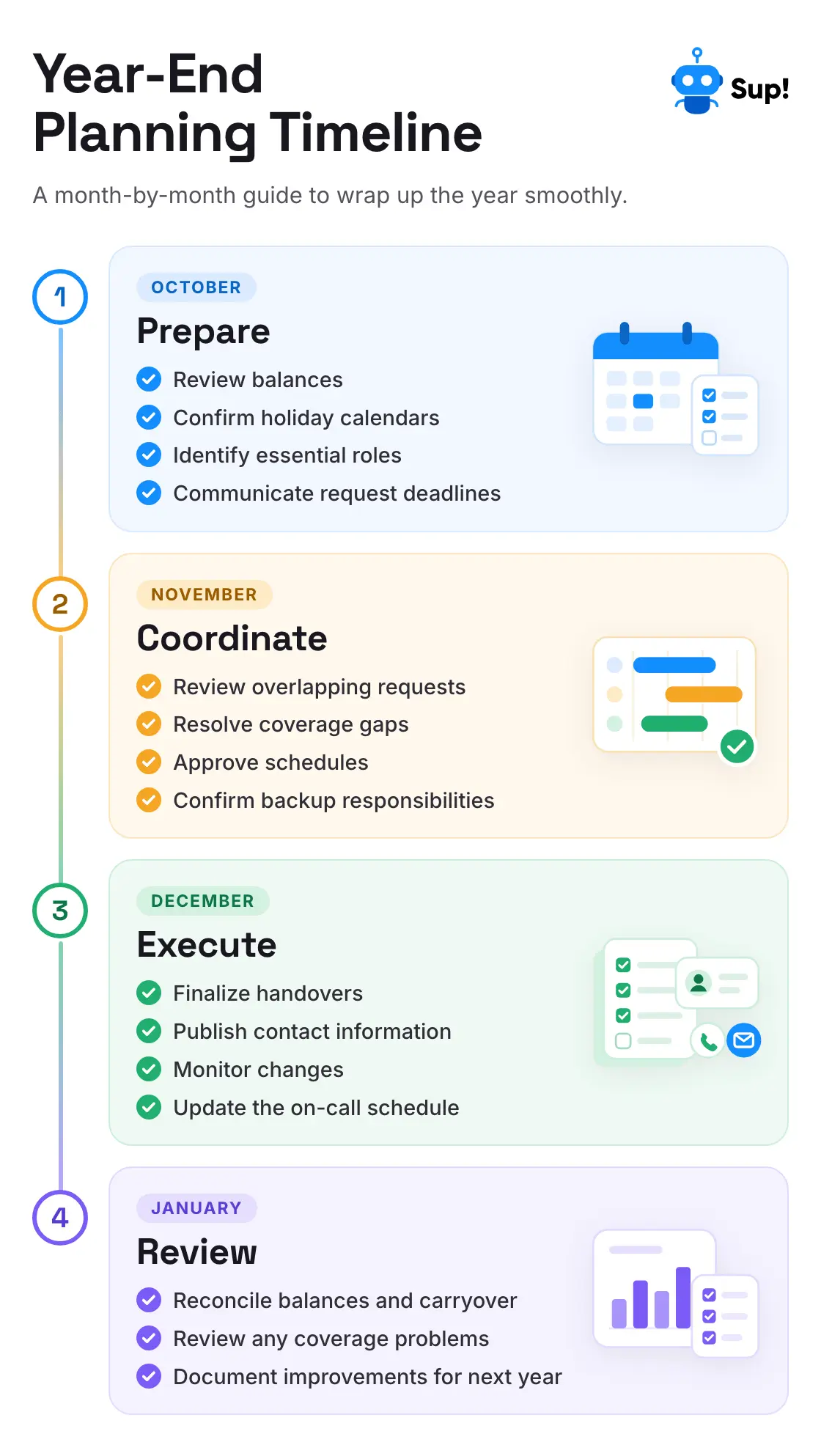
8. A Simple Year-End Leave Planning Timeline
You don't need months of meetings to organize December leave. A few well-timed actions can make a big difference.
| When | What to do |
|---|---|
| October | Review PTO balances, confirm policies, check holidays, and announce leave deadlines |
| Early November | Collect requests, identify overlaps, and discuss possible coverage issues |
| Late November | Finalize approvals, assign backups, and prepare handovers |
| December | Keep calendars current, respond to changes, and follow the agreed coverage plan |
| January | Reconcile balances, review issues, and improve next year's process |
Treat these dates as a starting point. Teams with strict operational requirements or complex holiday schedules may need to start earlier. The important thing is that employees have time to plan and managers aren't making critical coverage decisions at the last minute.
Your Year-End Leave Planning Checklist
Before December gets busy, make sure you've covered the essentials.
Policies and communication
- Confirm applicable PTO expiration and carryover rules
- Announce a clear deadline for planned leave requests
- Explain how overlapping requests will be handled
- Review exceptions, notice requirements, and staffing restrictions
Visibility and approvals
- Collect leave requests in one place
- Check approved and pending absences
- Review public holidays across locations
- Identify dates with insufficient coverage
- Communicate approval decisions clearly
Staffing and handovers
- Identify essential responsibilities
- Set minimum coverage requirements
- Assign primary and backup contacts
- Confirm skills, access, and escalation procedures
- Complete handovers before leave begins
Final preparations
- Update the team leave calendar
- Confirm the on-call rota
- Set out-of-office messages
- Make emergency contact information accessible
- Review any last-minute schedule changes
Make Year-End Leave Planning Easier, Not More Restrictive
December doesn't have to turn into a fight over who's allowed to take time off. Most year-end scheduling problems become easier to manage when teams start earlier, communicate clearly, and make leave information visible.
Set request deadlines before the rush. Review balances and public holidays. Handle overlapping requests fairly. And most importantly, arrange coverage before the people responsible for critical work head out for their break.
The goal isn't to have everyone available throughout December.
It's to make sure employees can take the time off they're entitled to while essential work continues smoothly.
For teams already working in Slack, SUP!'s PTO tracker can help bring leave requests, approvals, balances, team calendars, and holiday information together. That means less time chasing down vacation plans and more time making sure the team is ready. Because a good holiday plan should let everyone enjoy the break, including the manager who organized it.
 Add to Slack
 Add to Teams
 Add to Webex
Frequently Asked Questions
When should teams start year-end leave planning?
October is a useful starting point for teams expecting significant December absences. It provides time to review unused PTO, announce request deadlines, identify overlapping leave, and arrange essential coverage. Teams with complex staffing requirements may need to begin earlier.
How should managers handle overlapping holiday requests?
Use clear and consistently applied policies, check operational coverage needs, and discuss alternatives with employees when requests conflict. Avoid making arbitrary decisions or assuming the first person to request leave must always receive priority. Existing approvals, legal requirements, and company policies should guide the process.
How can Slack help with year-end leave planning?
Slack can help teams communicate request deadlines, share reminders, coordinate handovers, and make important announcements accessible. A Slack PTO tracker like SUP! adds structured leave requests, approval workflows, leave balances, calendars, and relevant policy checks, reducing the need to manage everything through separate messages.
Does unused PTO expire at the end of the year?
Not necessarily. Unused PTO may expire, carry over, or be subject to payout requirements depending on company policy, leave type, and applicable employment laws. HR should verify the rules before telling employees they must use their remaining balance by a particular date.
How can managers avoid staffing gaps during the December holidays?
Identify critical responsibilities, establish minimum coverage requirements, review overlapping leave, and assign primary and backup contacts before approving the final schedule. Make sure backup employees have the necessary skills and access, and prepare handovers before anyone leaves.